

New in my-picturemaxx: Highlights of version 5.8
3 minutes
With the new "my Trends" service, the new version of my-picturemaxx offers current topics at a glance, as well as improvements to my Offers, video playback, and series display.
Highlight my Trends
Current topics at a glance
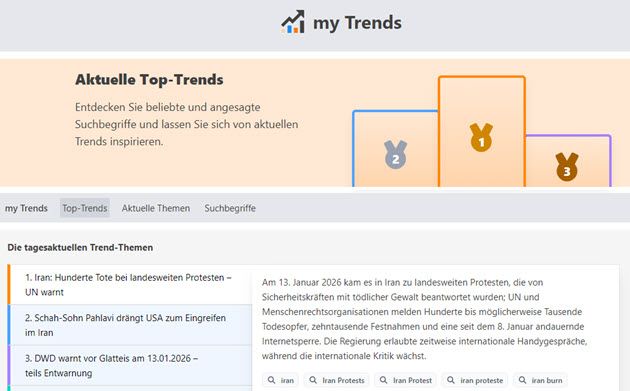
With my Trends, you always stay up to date. The service delivers the latest trending topics and most popular search terms in my-picturemaxx, presented in a clear and compact format. This allows you to respond quickly to current topics.
Daily trending topics: Get a compact overview of the topics currently being searched for in my-picturemaxx, straight to the point, with no extra research needed.
Most popular search terms: Compare different time periods (e.g., 48 hours, 7 days, or 1 month), to clearly distinguish short-term developments from topics with lasting relevance.
Rankings are based on current, anonymized search queries and online trends that are continuously tracked. The data is analyzed and processed in real time using advanced AI-powered methods.
Highlight: my Offers
Comprehensive optimization of offers
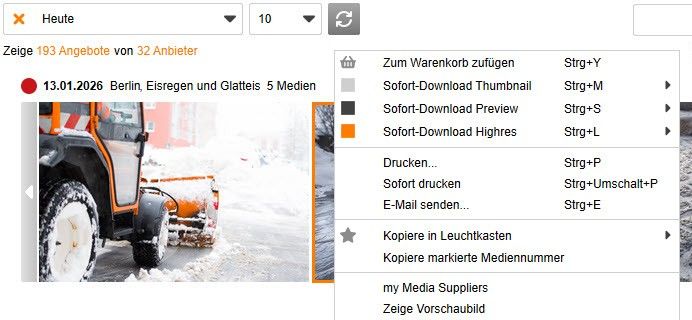
The my Offers service has been comprehensively revised for better performance and a clearer overview. Optimized display of offers and content, combined with improved scrolling, enables significantly more efficient use. Even extensive offers remain easy to navigate.
Individual media items within an offer can now also be accessed via the context menu or dragged and dropped into the lightbox. The entire offer can be displayed in preview mode.
Support for multi-series
Enhanced series display
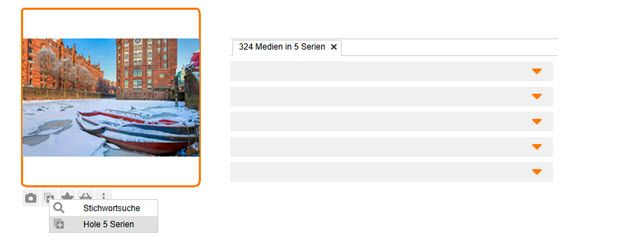
Multiple series of a media item can now be displayed in a grouped view. If a media item is assigned to a series, you can open it via the series icon on the thumbnail. If a media item belongs to several series, the "View Series" function can be used to retrieve and display all related series together.
At a glance
Further practical improvements
Faster playback for preview videos
Videos in my-picturemaxx now start playing faster. (The new instant playback feature is available for all videos that have been optimized for streaming by their respective providers.)
Filter option in the shopping cart by “Trigger”
A new filter option is available for the shopping cart. It allows you, for example, to filter for downloads that were not completed due to technical reasons or for media items with an original reference.
Detailed logging when needed
For support purposes, you can enable the “Advanced Log” option from the Help menu to provide more detailed diagnostic information for analysis. Our support team may point this out to you if necessary.
About my-picturemaxx
Discover the capabilities of our professional media search software: Learn more about my-picturemaxx
An overview of all updates, bug fixes, and administrative changes: Go to the Release Notes